
When receiving LOCUS from the faucet in the test wallet and attempting to transfer it, both “Balance” and “Inactive Balance” are shown. What do these mean?
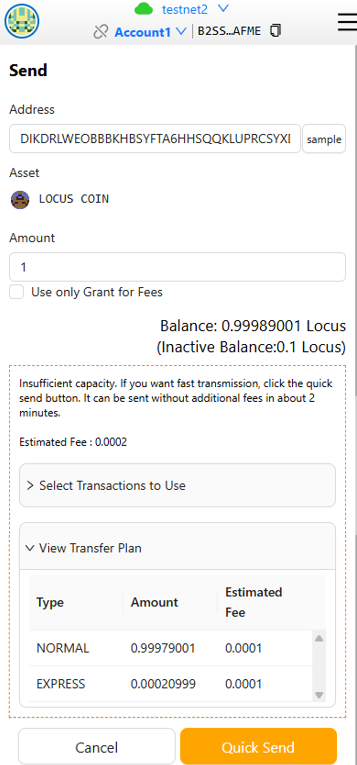
Tokens received from the faucet are initially treated as an Inactive balance until they are activated. Once activated, they become part of your available balance.
- NORMAL Mode: Transfers use the available balance
- EXPRESS Mode: Transfers use the Inactive balance
When making a transfer, if your balance is sufficient to cover both the transfer amount and the fee, the transaction will be processed in NORMAL mode. If the available balance is insufficient, the system will check whether the transfer can be processed using the inactive balance (EXPRESS mode)
However, both balances cannot be combined in a single transaction. If both balances are used separately, fees may be incurred twice.
Therefore, it is recommended to use the available balance after activation whenever possible, as this is more cost-efficient.
The EXPRESS mode should only be used when a quick transfer is required before activation.
*Inactive Balance: If your balance is insufficient and another user sends you additional tokens, those tokens will appear in your wallet as an inactive balance until the consensus process is completed.